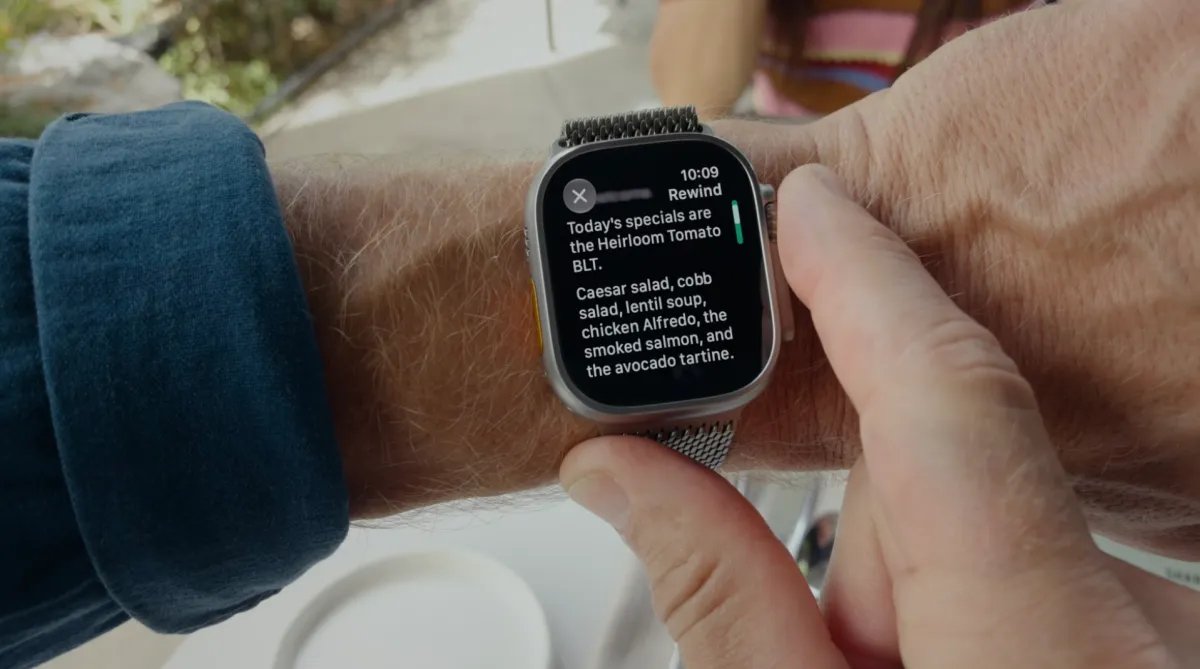
Apple’s “Audio Intelligence” technology for the Apple Watch is now rolling out to beta testing, initially for developers in the iOS 27.3 update, after it was first announced at the company’s Surprise and Shine hardware event in September. The technology includes a set of four optional artificial intelligence features that allow Apple Watch Series 12 users to detect important sounds, identify songs, catch up on conversations and take notes.
The audio recognition feature will help deaf and hard of hearing users identify important sounds like sirens, alarms or doorbells from their watch, while the song recognition feature will connect to Apple’s Shazam app to detect music playing in the background and identify the song name and artist.

The potentially more controversial features, however, are those that listen to human conversations: Live Rewind and Siri Recaps.
Given the backlash against AI recording devices like Meta’s AI Glasses and other AI wearables, Apple has tried to create a space where features can be useful for Apple Watch owners while still respecting the privacy of those around them.
With Live Rewind, the idea is to let you go back in time to see what someone just said, in case you missed it. For example, if someone was giving you verbal directions or reading a long list of specials at a restaurant, you can double-press the watch’s digital crown to see what was said in the last 15 seconds as a snippet of text displayed on the watch face. You can either view this snippet and then do nothing and it will disappear forever. Or you can save it in the separate Siri app that comes with iOS 27 for later access, which can be useful if you want to remember someone’s name or take a quick note from a quick presentation.

Apple says users will also be able to tap an “Ask Siri” option that appears below a snippet of text if they have questions about something that’s been said — like a technical term they don’t understand, or maybe some sauce the waiter mentioned they don’t know, among other things.
When you press the digital crown twice, a beep will sound and an animation will appear on the watch. This is to signal to people through a combination of gesture, sound and visuals that you have recorded something that was said.
If you don’t save them, these snippets will be automatically deleted after 30 seconds.
The second option, Siri Recaps, takes this ambient listening technology even further by allowing Apple Watch owners to take high-level notes of their conversations.

Importantly, Apple says it doesn’t identify speakers, store raw audio, or provide word-for-word transcriptions. Instead, the feature summarizes the conversation with a short sentence and a few bullet points that identify key points. For example, depending on the topic, bullet points can include things like important dates or deadlines, pricing or payment plan information, and other factual information.
Apple suggested that this feature could be used in scenarios such as work meetings, parent-teacher conferences, in-person training, or other places where you might need to remember what tasks you need to complete or what was said. Essentially, it’s meant to mimic the user’s ability to jot down their own notes – without adding emotion or tone.
This could be especially useful at times when you are unable to write your own notes, either because your hands are full or you are trying to focus on what is being said at the time. Recaps won’t record conversations when you’re listening to music with headphones or using their noise canceling features.
At the end of the day, you’ll be prompted to review your saved Siri recaps when the feature is enabled, and then choose which ones you want to save, if any. These notes can be saved in the Notes app or even exported to the Journal app if they are more personal in nature. If you do nothing, the recaps will delete themselves within seven days.
This reminder to check the Siri recaps you’ve recorded will also appear when you first unlock your Apple Watch in the morning.
Users can choose to enable Siri recaps manually, or they can configure a schedule, such as having recaps only run at work, or making sure they never run at night. Even if it runs as scheduled, you can still turn off the recap feature at any time from the Control Center.
Apple notes that Siri Recaps has been designed to omit sensitive information such as government-assigned identifiers, financial and authentication information, certain personal identifiers, and any language that promotes self-harm.
Audio Intelligence features for Apple Watch Series 12 and Apple Watch Ultra 4 rely on a combination of Apple hardware, software and services. This includes the S11 chip, built-in microphone and Apple Intelligence models that run on the iPhone, as well as Apple Private Cloud Compute.

The always-on processor contains a secure enclave – a hardware-protected memory area that cannot be accessed by the rest of the operating system – where a dedicated audio buffer handles raw audio. This allows the audio to be processed without actually being accessible to anyone, including Apple. Audio is only accessible to a paired iPhone through a secure pairing mechanism between it and the watch.
To work, the lightweight AI models on the Apple Watch’s S11 chip detect if there’s a conversation the wearer is a part of, which is then relayed to the secure enclave on the iPhone. On-device processing on the iPhone turns the audio into condensed text, meaning the text of the conversation with the filler words removed. This condensed text is then encrypted and sent to Apple Private Cloud Compute (PCC) to create a summary of the conversation that is sent back to the phone. (The recap and any summaries used to create it are immediately removed from the PCC).
The recaps you then access on your iPhone are only accessible to you, not Apple. And they’re encrypted when they’re synced between your multiple Apple devices.
Similarly, the Apple Watch will transfer the audio to the iPhone for processing, creating 15-second snippets for live streaming.
Apple says none of these features should affect the battery life of your watch or phone. The features will later be launched in public beta for wider testing before being publicly available to everyone.
We may earn a small commission when you make a purchase through links in our articles. This does not affect our editorial independence.